
Visitation for prisons and detention facilities
Visitors apply and book custody visits from a phone. Staff check the ID, approve with two signatures and admit the party at the desk. Every step is on an audit record nobody can edit, and a real facility's visitor data is hosted in its own cloud account in Malaysia.
Visitation is part of Waitlist App Enterprise.
From request to close-out
-
1
Set up the facility
We apply the facility's setup pack: visiting rooms and hours, visit types, visit caps, party limits, what visitors are told, ID image retention, the AI region and the messaging channel.
-
2
The visitor applies
On a phone, with a code sent by WhatsApp (by SMS in the US and Canada). They name the person in custody, say how they are related, add the children who come along and upload their ID.
-
3
Staff check the ID
A reviewer opens the ID (the view is logged) and marks it Verify, Not valid or Ask again.
-
4
Screening
Waitlist App checks the person in custody's visiting privilege. The facility's screening table recommends clear, refer or decline and shows the rule it used.
-
5
Two reviewers sign
A reviewer approves, refuses with a reason or sends the application back. With two reviews set, a second, different reviewer signs.
-
6
The visit is booked
The approved visitor picks a visit type, a date and a time. Booking enforces the visit cap and the party limits.
-
7
The visitor is told
Received, approved, not approved, needs more information, ID needs another photo, visit confirmed, visit cancelled: each change is sent once, on the facility's channel, in the language the visitor applied in.
-
8
Admitted at the desk
The desk scans the pass QR, compares the person with the verified ID photo, ticks the children and admits the party. A refused scan shows its reason and is logged.
-
9
Who is inside
The roll lists everyone in the visiting area with their companions and flags overstays.
-
10
Lockdowns and suspensions
A supervisor locks a housing unit down or suspends one person's visits. Booked visits are cancelled, visitors are told, and desk scans are refused until the hold is lifted.
-
11
End of day
Close-out checks everyone still inside out, children with their adult.
-
12
The audit trail
Who opened an ID, who verified it, who signed, who admitted whom, and every hold and suspension, on a record nobody can edit.
Where AI helps
AI assists; the facility's rules and its people decide. No AI output approves, refuses, admits or bans anyone. Each item is switched on per facility and uses the AI region the facility chooses.
Available on request
-
Step 2 Visitor rules assistant
Visitors ask what they can bring, which ID to show and when they can visit. Answers come only from the facility's published visiting rules, and say nothing about a person in custody beyond what the facility discloses.
-
Steps 2–3 Reading the ID at upload
Reads the name, document number and expiry, asks for a retake when glare hides a detail, and flags any mismatch with what the visitor typed for the reviewer.
-
Steps 3 and 8 Face match, with the visitor's consent
Compares the ID photo with a photo taken at the desk. The result is a flag for staff.
-
Step 5 Request brief for the reviewer
A short summary: the stated relationship against past records, past visits and refusals, visits used, active holds or restrictions, and anything inconsistent. It makes no recommendation.
-
Step 8 Staff notes by voice
Desk officers dictate incident and visit notes, which are transcribed and summarised onto the visit record.
-
Step 12 Questions over the visit log
Staff ask in plain words, such as "who visited Housing unit C last week", and the answer cites the log entries.
-
Step 12 Pattern digest for the security lead
Daily or weekly: one visitor linked to many people in custody, visit frequency spikes, repeated refused scans, "Admit anyway" overrides per officer, and deposit patterns.
The screens
From the demo facility. Every person in them is made up, and every ID is a sample.

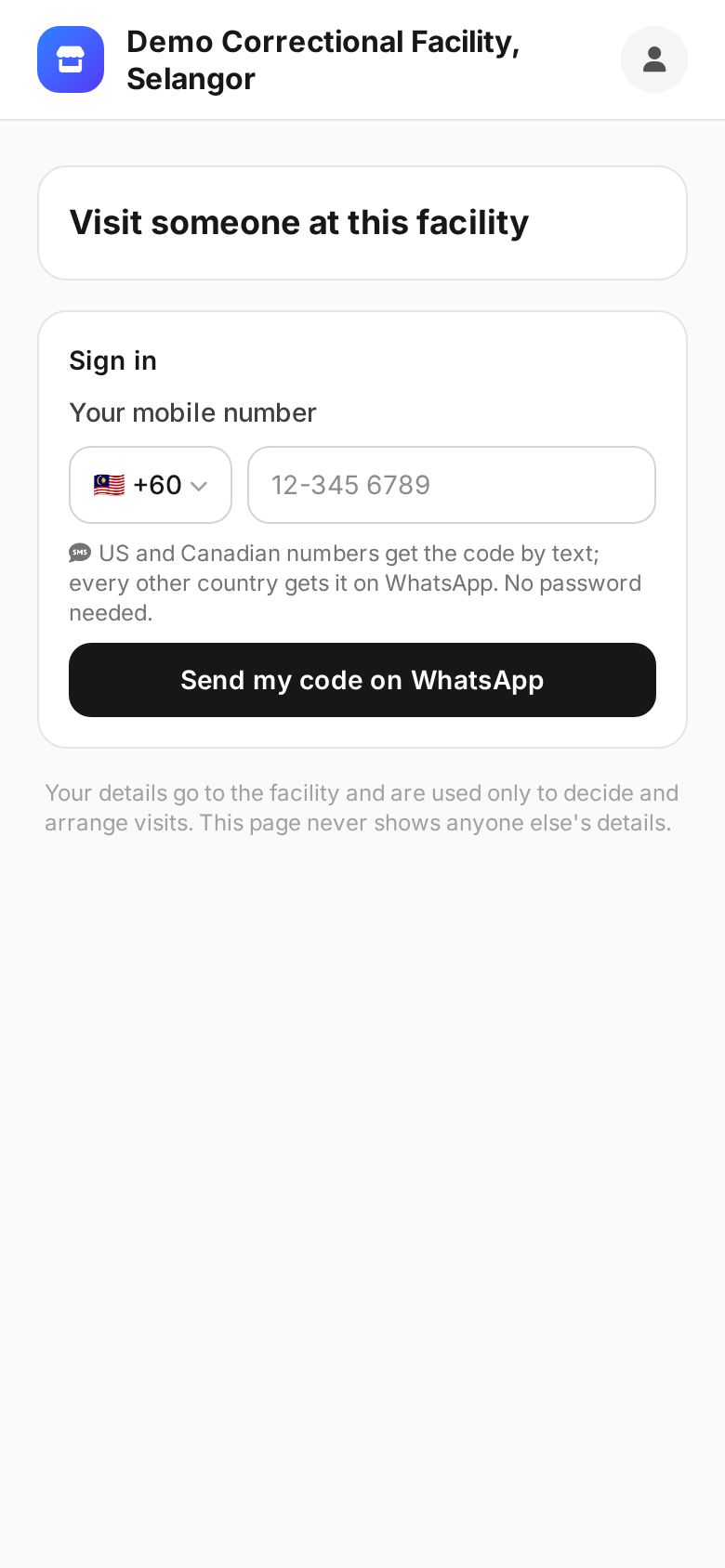
Visitors apply from their phone
No app to install and no password. The visitor signs in with a code sent to their phone by WhatsApp (by SMS in the US and Canada), and applies: the person in custody's facility number, their relationship, the children who come along, and their ID with a face photo. The page speaks ten languages, including Bahasa Melayu, Chinese and Tamil. The ID photos go straight to the identity check service, and the visitor page keeps none of them.
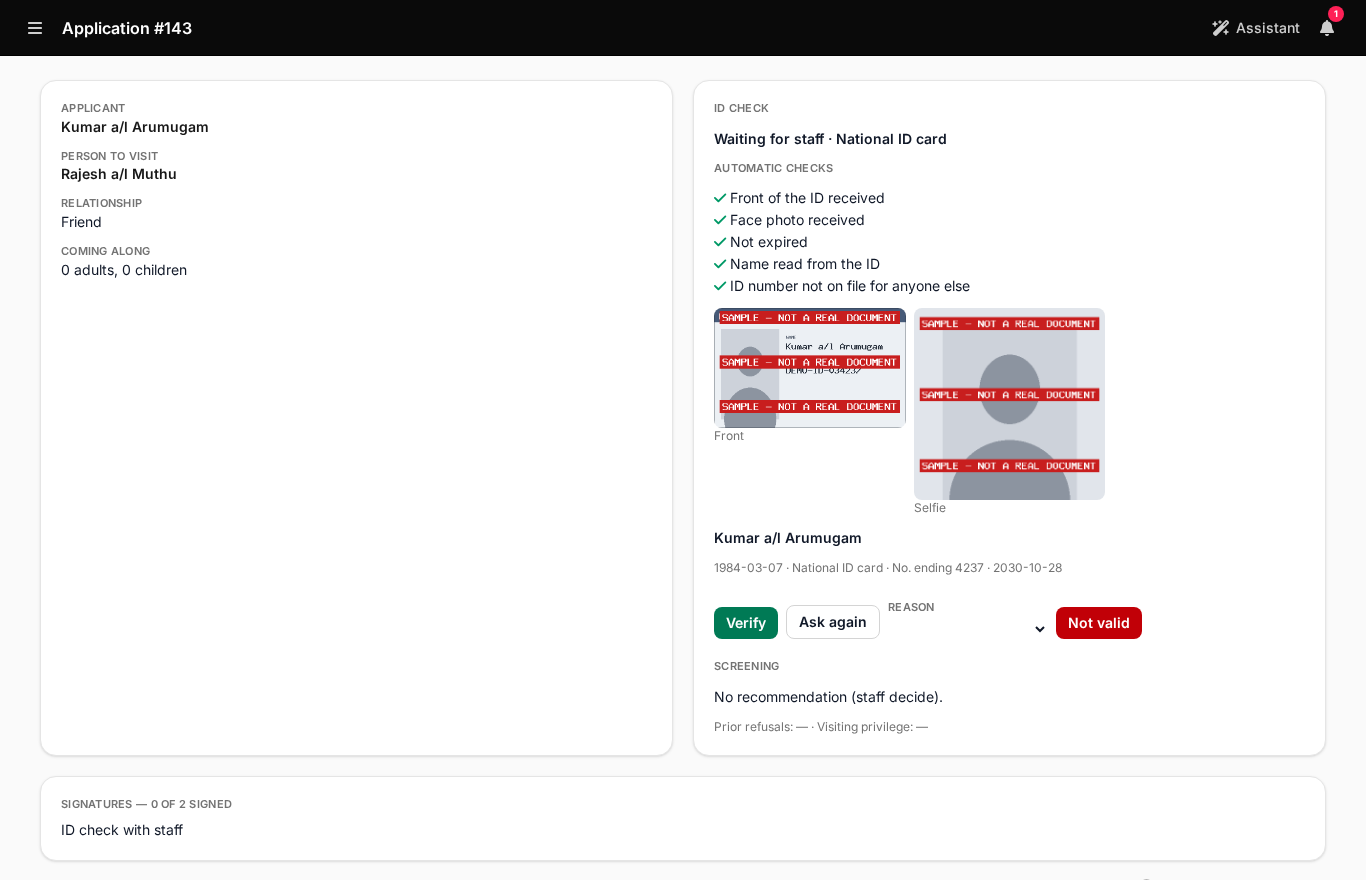
Staff check the ID
The reviewer sees the automatic checks (front received, face photo received, not expired, name read from the ID, ID number not on file for anyone else), the images and the details read from the document. Opening the images is recorded with the reviewer's name. Not valid and Ask again send the visitor back to upload a new ID.
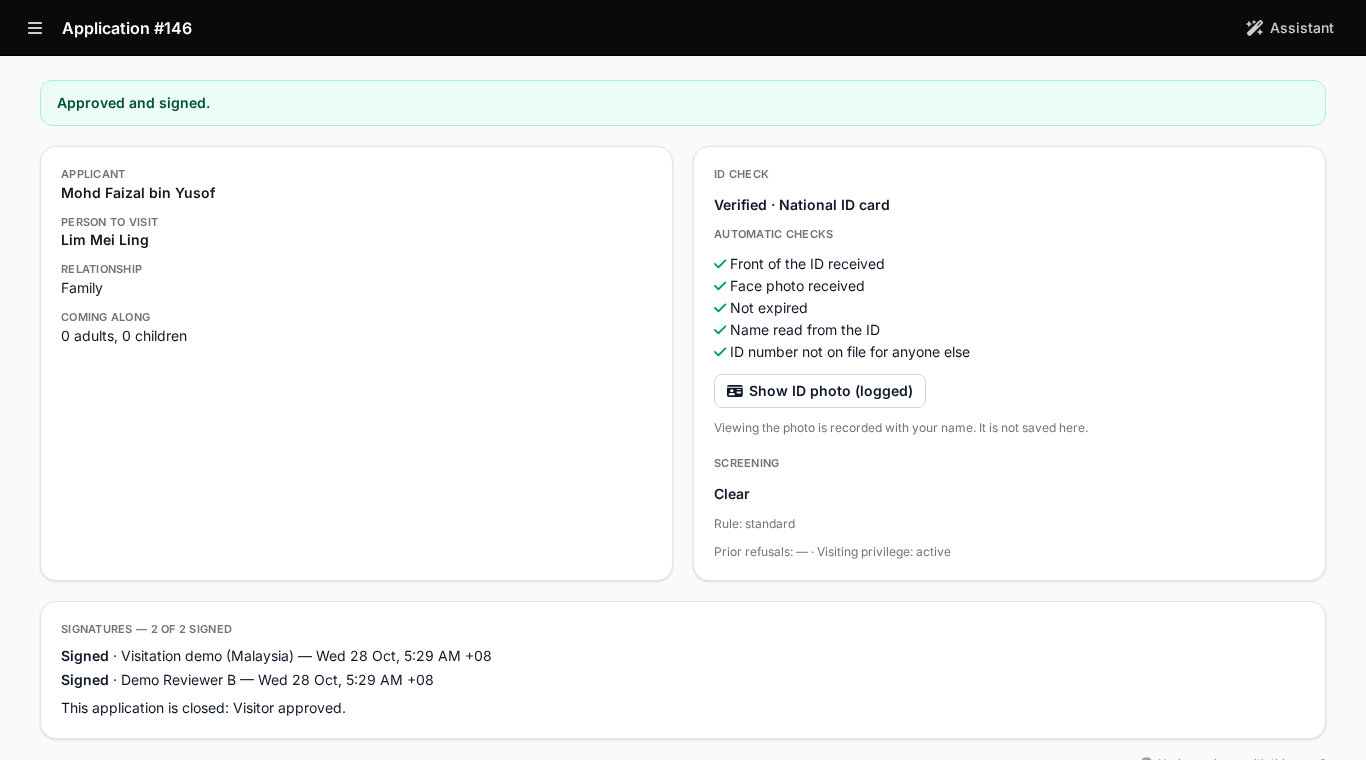
Two different people sign the approval
The facility sets how many reviews an approval needs, from one to three. The same person cannot sign twice. The approval records the visitor's relationship to the person in custody and issues a visitor pass for the visiting area, valid for the period the facility sets.
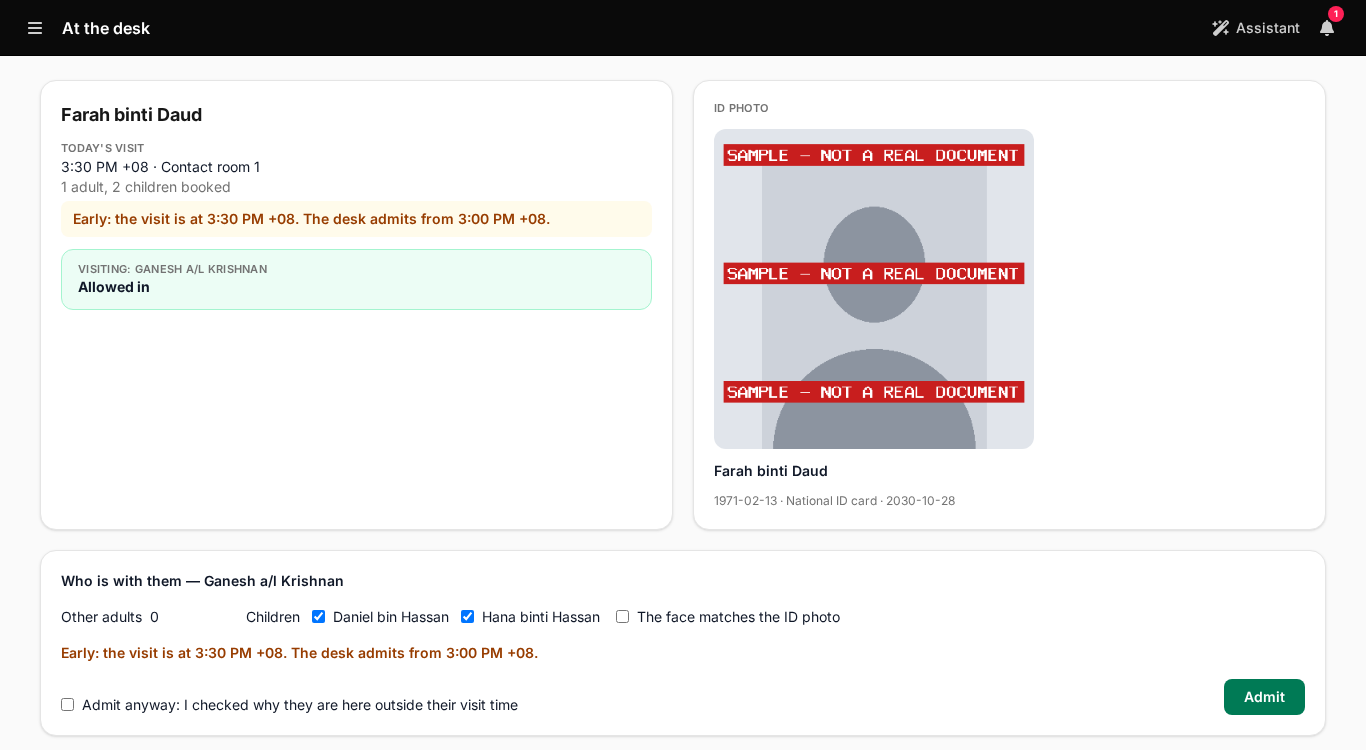
The desk admits the party
Scan the pass QR, or search today's visitors by name. The desk sees the visit time, who is booked, and the verified ID photo to compare with the person in front of them. Outside the facility's admit window, the officer must tick "Admit anyway" first.
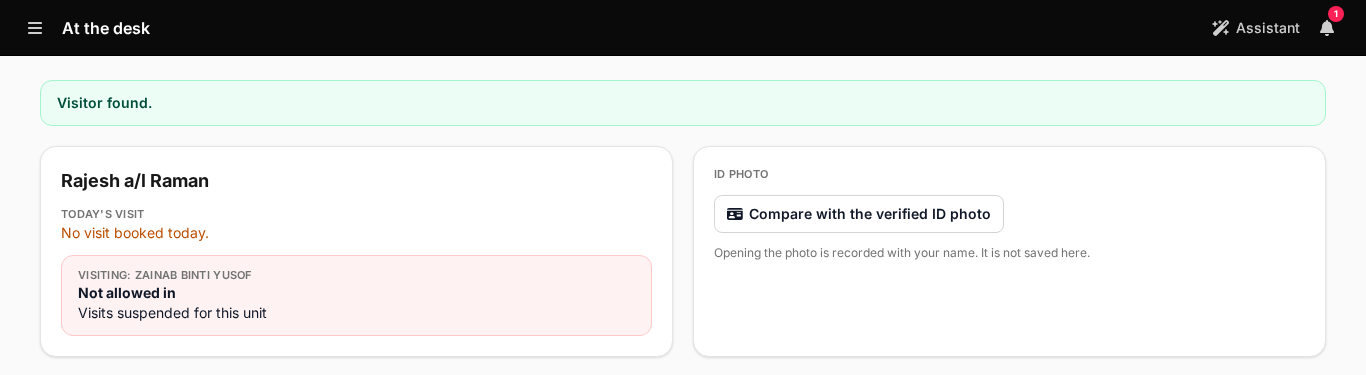
A lockdown stops visits at once
A supervisor locks a housing unit down from the Residents screen. Every booked visit to someone in that unit is cancelled, the visitors are told on the facility's channel, and every scan for that unit is refused with the reason until the lockdown is lifted. Suspending one person's visits works the same way.
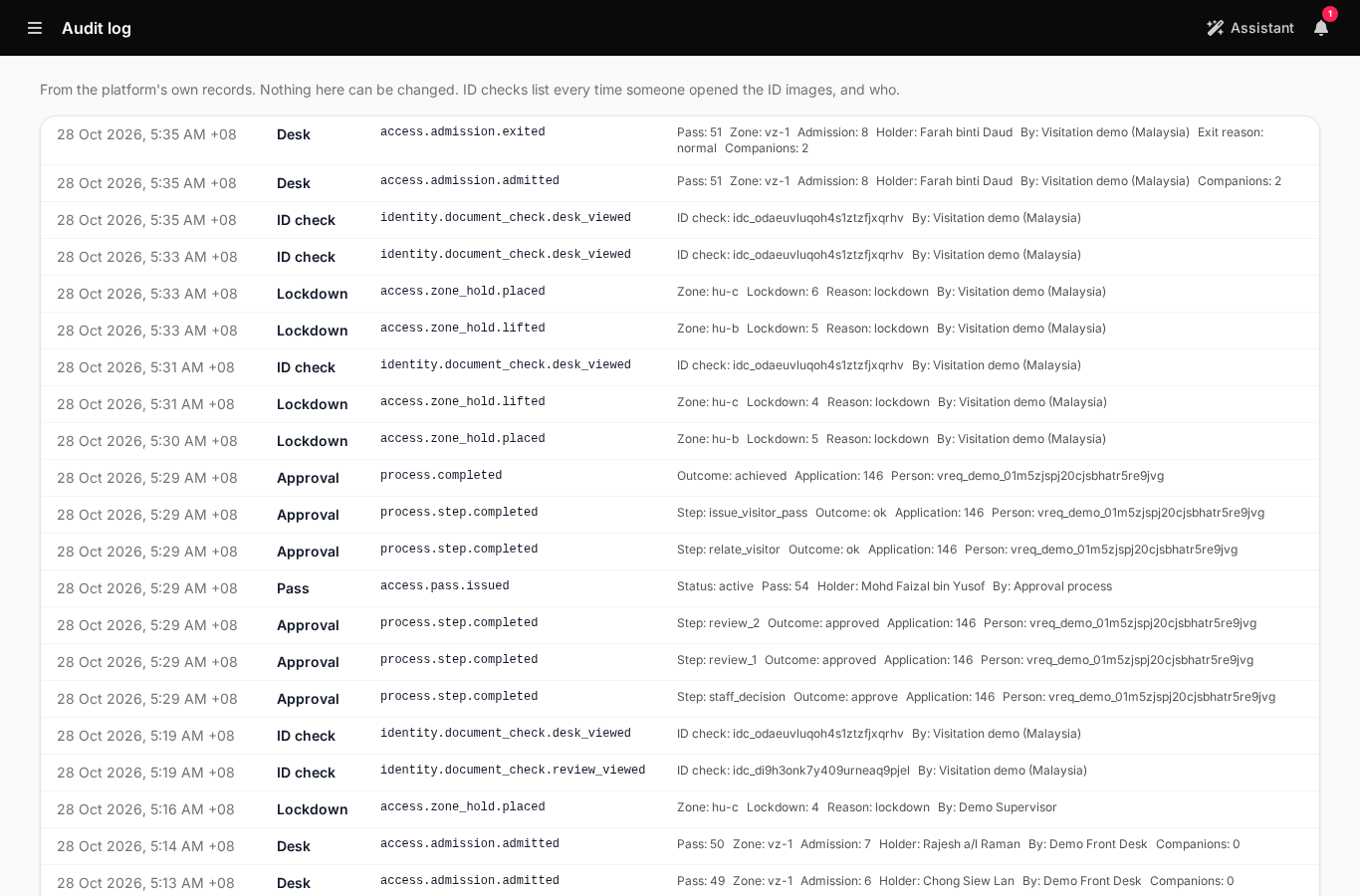
Every step is on the record
Nothing in the audit log can be changed. It lists every time someone opened an ID and who, the verification, each signature, each admission and exit, every lockdown and suspension, and every refused scan.
What the facility sets
A facility's behaviour is in its setup pack, not in code. Changing one rule changes only that rule.
- Housing units and visiting areas, visiting rooms, visit types (contact or non-contact), capacity and weekly hours.
- Visit caps per person in custody and period, enforced or warn-only, and party limits: total, adults, children, and whether children need an adult.
- The application form, how many reviewers sign, and how long an approval lasts.
- The screening, booking and relationship decision tables. A person at the facility publishes each version.
- What visitors are told: whether the person they name is matched, which fields are shown, which refusal reasons are shown. Everything defaults to nothing.
- ID image retention: kept 365 days and then blanked by default, with opt-in earlier removal. The check's record is never deleted.
- Where AI processing may happen (in the country, a region group, or anywhere) and the messaging channel for codes and notices: WhatsApp, or SMS in the US and Canada.
Where the data lives
Visitor data is hosted where the facility chooses. Our hosted service keeps only what it needs to point to it.
- A real facility is hosted in its own cloud account in Malaysia: the AWS Malaysia region, ap-southeast-5. The ID images, the details read from them and the face photos stay there.
- For a facility in its own cloud account, our hosted service holds only references: party, check and pass IDs. Never names or ID details.
- Our hosted service hosts the demo and trials, with made-up people only.
- For Malaysia, the setup applies a PDPA posture written for counsel to confirm: a data protection officer on record before any ID is stored, one stated purpose for ID checks, logged views, and children's dates of birth used only to say whether they are minors.
- If a service is unreachable during an approval, the application waits for a reviewer. It is never refused automatically.
- How a custody visit works, from request to close-out The full walkthrough, step by step, with the Malaysian rules behind the reference rule set.
- All use cases Every way businesses and public services use Waitlist App.
Book a demo
Visitation is part of Waitlist App Enterprise.
We set up each facility: its account, the setup pack, staff roles and the messaging channel, and for a real facility, its own cloud account in Malaysia.
Book a demoQT
Waitlist App assistant
